Skip to content

generational divides

Older: That’s crazy
Younger: That’s wild

Older: Completely or Absolutely
Younger: ? or 100%

Older: I kinda don’t…
Younger: I low-key don’t…

Older: Know what I mean?
Younger: IYKYK

Older: That’s weird
Younger: That’s sus

Older: I got your back, my friend
Younger: I got you, fam

Older: You’re too much
Younger: You’re so extra

Older: You’re the best!
Younger: You’re the GOAT

This is a test for using quill on this blog

ghost peppers ouch

Lesson learned: ghost peppers affect you the whole way through the body! One accidental ingestion and 12 hours of intermittent heat ???

night time, city lights in the background, at night, showing a telephone post with text saying 'big data is watching you'

online resolutions

I never made formal resolutions for any new year. That said, it’s a good practice to better yourself so I think I’ll continue what I started doing last year with my digital presence.

I’m struggling to find a balance between personal privacy and being public. I don’t know where to draw the line right now. For that reason, I’ve practically given up publishing my content or data online. It’s gloomy to feel like the internet wants to do nothing more than take advantage of me. That’s where most of my thoughts go every time I want to post something like this.

So, as a continuation of a personal resolution to take back control of my digital life instead of mindlessly feeding my data into all the apps, I will do two things this year.

Hide

I began a personal quest to protect myself from services like Facebook by encapsulating how I use it everywhere. In a significant way, I’ve removed my voice from most apps and sites by participating as little as possible. I’ve removed any data I can from search engines that I don’t think belongs there. I continue doing these things like not installing Google Chrome on any computer and uninstall it from all my personal computers. Chrome is replaced with Brave Browser but I primarily use Firefox for everything now. I will continue to wind down using large companies products as I’m able to and support freely available open source software.

This all comes at a cost. I don’t have a way to privately share my life outside of some targeted private messages, calls or seeing people in person. It’s extreme and uneasy to disconnect from large parts of society. However, the more I learn about what’s going on, the more I think this active approach to privacy is needed.

Share

I don’t know how I’ll find a good balance, but I must consider that the majority of people I care about live outside of my personal physical and digital bubble. I want to be more present with life outside of occasional private messages. Anything that goes here on this website will be public enough that data aggregators can have it. I can’t control that part but I can control what I put out there.

This is a public pledge that I treat as a fun adventure to learn and help society however possible. I will live as a naive optimist that privacy isn’t completely dead, doesn’t have to be, and there’s always a good way to be online. The internet has provided so much to me, but it’s now a place that takes even more from me. I choose not to give it so much. I will continue this journey by embracing ideals of using small technology.

Inspiration

This is me reminding myself that we’re living in the best of times in human history. Even if my privacy fears are real, I need reminders that ultimately I’ll be fine. Too often, nothing is as bad as it seems in a moment. I can’t change reality but I can change how I react.

20 plus 20

This year, I lived as many years after 2000 as I did before 2000.

I hope #windows will eventually work on dual monitor redraws and windows placements with a secondary monitor. It’s annoying I split windows between a laptop monitor and secondary monitor, unplug and re-plug, where the windows placements aren’t remembered.

craft cms inside of laravel homestead on windows 10 using wsl

Install Craft button

I’m jotting this down for future Micah because there are a couple of things in this process that weren’t obvious to me despite at least a couple of tutorials going through the process of installing Craft CMS from scratch using Laravel Homestead on Windows 10. I wanted to include Windows Subsystem for Linux (WSL) so this goes a little further.

I will mirror a similar tutorial that has a lot of the same steps but I will highlight on my pain points because of using the Bash script.

Set Windows up

Let’s get Windows set up first. Configure and install the following below, or use the commands below this list.

Use Powershell for these commands.
Install Chocolatey

Set-ExecutionPolicy Bypass -Scope Process -Force; iex1

Install Virtualbox and Vagrant

cinst virtualbox vagrant

Install the Homestead Vagrant box

vagrant box add laravel/homestead

This will take a while, possibly more than an hour if your internet speed is low. I’d suggest you keep this running the background in another terminal window while you take care of the rest of this. If you haven’t already installed WSL below, I’d wait to run the above command until you reboot Windows.

Install WSL

Enable-WindowsOptionalFeature -Online -FeatureName Microsoft-Windows-Subsystem-Linux

WSL made this process a little more challenging because Bash inside of Windows is not yet a first class citizen when it comes to traversing the operating system. Within the Ubuntu distro, there are packages that need to be added.

Use Bash on WSL for these commands.

Check what’s already installed in WSL

apt list --installed

Install what you don’t have from the following.

Update packages list

sudo apt-get update

Install PHP latest version and verify it installed

sudo apt-get install php
php -v

Install PHP CURL

sudo apt-get install php-curl

This fixed an error I kept getting:

craftcms/cms [version number] requires ext-curl * -> the requested PHP extension curl is missing from your system.

Install Composer and move into global path

php -r "copy('https://getcomposer.org/installer', 'composer-setup.php');"
php -r "if (hash_file('sha384', 'composer-setup.php') === 'a5c698ffe4b8e849a443b120cd5ba38043260d5c4023dbf93e1558871f1f07f58274fc6f4c93bcfd858c6bd0775cd8d1') { echo 'Installer verified'; } else { echo 'Installer corrupt'; unlink('composer-setup.php'); } echo PHP_EOL;"
php composer-setup.php
php -r "unlink('composer-setup.php');"
sudo mv composer.phar /usr/local/bin/composer

Verify everything is installed so far, now it’s time to get through the rest of the installation process.

Use Bash on WSL for the rest of this.

Homestead configuration

Note: I am approaching this as a global installation because it allows Craft to stay encapsulated from the web server that Homestead creates. It also allows you to use Homestead for multiple projects for the same Homestead environment.

Create projects directory or use existing one; this is where your web projects live.

C:\Users\[username]\Sites\

Above is an example on my OS where my web projects live. Now let’s go in there and create the Homestead container directory for your Craft projects.

cd C:\Users\[username]\Sites\
mkdir [homestead_container] && cd [homestead_container]

where [homestead_container] is the name of the company or project. This directory will contain two sub-directories, one for the Craft repository files and the other for vendor files containing Homestead.

You should now be in the following directory shown in Bash:

/mnt/c/Users/[username]/Sites/[homestead_container]

Continue using Bash on WSL for the following commands in the current directory.

Install Homestead

composer require laravel/homestead

Generate Vagrantfile and Homestead files

php vendor/bin/homestead make

Install Craft

Install Craft (for new installations)

composer create-project craftcms/craft [Path]

where [Path] is the name of the sub-directory containing Craft. I just called it craft.

Your directory structure will probably match this screenshot
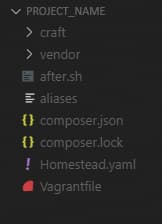
project files

Configure Homestead

Open Homestead.yaml in your editor. As of Homestead 9.0.7, you’ll see the following generated code in the Homestead file.

ip: 192.168.10.10
memory: 2048
cpus: 2
provider: virtualbox
authorize: ~/.ssh/id_rsa.pub
keys:
    - ~/.ssh/id_rsa
folders:
    -
        map: ~/code
        to: /home/vagrant/code
sites:
    -
        map: craft.test
        to: /home/vagrant/code/public
databases:
    - homestead
features:
    -
        mariadb: false
    -
        ohmyzsh: false
    -
        webdriver: false
name: [homestead_container]
hostname: [homestead_container]

This is where I started with my confusion. I’ll highlight only a few lines that might cause issues.

ip: 192.168.10.10

Most of the time, this won’t be an issue. If your internal network, or LAN, is using a network in the range of ip: 192.168.10.x, you’ll have to change the last two ranges of the IP address so that it’s not starting with 10.

As long as the above is valid, the next issue to verify is that your firewall won’t prevent the localhost from starting. Sometimes firewalls can be aggressive and Windows Defender, VPNs like NordVPN, PIA, Mullvad and others, or Antivirus applications can all prevent localhost connections from being made. Each has its own IP filtering that you should make sure isn’t getting in the way. If there is a firewall blocking localhost, you might get a general failure when you ping the above IP address. This has bitten me before!

Inside of folders: and sites:, let’s make updates.

folders:
    -
        map: C:/Users/[username]/Sites/[homestead_container]
        to: /home/vagrant/code
        type: "nfs"

The first major thing I got stuck on is how to update the map value above. In this section, map is the local directory that contains your project and to is a directory inside of the Vagrant VM that mirrors the local machine. It’s syncing both ways, so you can make changes locally in your editor or you can SSH into Vagrant and make edits on the mirrored files and they will automagically stay in sync.

We can’t use this UNIX-based directory structure syntax since this is Windows

/mnt/c/Users/[username]/Sites/[homestead_container]

We have to use the inherent Windows structure syntax

C:\Users\[username]\Sites\[homestead_container]

EXCEPT for some reason the backward slash must be converted to forward slash!

C:/Users/[username]/Sites/[homestead_container]

When running the Vagrant virtual machine and trying to use my browser to go to the domain name specified inside of this file, all that would come up in the browser window

No Input File Specified

I couldn’t find any documentation on what was going on until I studied this Homestead installation tutorial and saw his use of the forward slash. It was such a small nuance that was easy to overlook!

Laravel briefly touches on the inclusion of NFS, but after a little research, I found that including NFS is a good idea for speed optimization. With that, we need to add NFS support to Vagrant in Windows.

vagrant plugin install vagrant-winnfsd

Using Homestead on Windows will probably be slow. Using it with WSL will probably be just as slow. When I say slow, it can take the browser anywhere from just a few seconds to anywhere up to 20-30 seconds just to start loading the asset files like CSS and JS. My average is about 7-10 seconds to get to that point. That’s really bad and I hope this improves as I learn more. With this in mind, there are some tweaks that can be made to speed up Vagrant inside of [homestead_folder]\vendor\laravel\homestead\scripts\homestead.rb with regard to NFS.

Look for a line that looks like the following:

mount_opts = folder['mount_options'] ? folder['mount_options'] : ['actimeo=1', 'nolock']

The last two array items are two mount_options and the article on speeding up Vagrant shows more possible options that you can add to that array to help speed up access and read times.

This whole section took a week to wrap my head around so I’m glad I could document it for others using Windows!

Let’s continue.

Map the updated domain name to the correct public directory inside of craft

sites:
    -
        map: craft.test
        to: /home/vagrant/code/craft/web

Change map to your preferred domain name. I’d suggest not using .dev for anything since Google now owns this and it can resolve on the regular internet. This is why I kept .test.

to needs to read the public directory inside of Craft. Older versions of Craft show a public directory outside of the craft folder. The latest versions of Craft 3 show the public directory as web inside of the Craft folder.

Finally, update the database

databases:
    - craft

If you didn’t already install vagrant-hostmanager, you’ll need to update your HOSTS file so that the virtual host name will resolve in the browser. Otherwise, vagrant-hostmanager is smart enough to do this for you.

192.168.10.10 craft.test

Optionally, I recommend enabling MariaDB for MySQL. It’s more efficient in several ways, enough so that it’s worth enabling every time.

mariadb: true

Turn on Homestead

Run Vagrant

vagrant up

This will take a few seconds to provision everything with the virtual machine and get its contained server up and running. Once completed, go to your browser and let’s go to the URL.

http://craft.test/

If everything was set up correctly, you should now see a 503 error that indicates the database isn’t set up correctly. If you don’t see something like a 503 error, or if you see the same thing I got earlier saying No Input File Specified, revisit the above sections to make sure everything was updated correctly.

Configure the Database

If you need to import a specific database, follow these instructions to import your database into Vagrant.

For new Craft installations, update the environment file inside of Craft. In your editor, open the craft directory and find the .env file. We have to make a couple of edits to the credentials.

# The database username to connect with
DB_USER="homestead"

# The database password to connect with
DB_PASSWORD="secret"

# The name of the database to select
DB_DATABASE="craft"

This should now allow you to get into the Craft installation page

http://craft.test/index.php?p=admin/install

Credits

  1. New-Object System.Net.WebClient).DownloadString('https://chocolatey.org/install.ps1' []
me

over the hill

The journey that brought me to the 40th year of my life is now behind me. Now I look ahead of me as I continue walking down paths, taking new roads, and finding my way into the future.

As I reflect on my last decade, I smile at all my success and failure. The difference in where this last decade started and where it ends couldn’t be more different, but in so many ways it’s exactly the same. I continue searching for my next path, I give thanks for the things I have, and feel happy for where I’ve been.

I was able to be so many versions of my self.
I was a traveler, visiting Europe, South America and all over the US.
I was a photographer, spending some of my travels buried inside of a camera or my laptop creating photos.
I was a web developer, working for myself and for others, learning and creating code and doing my part to help make the internet better.
I was an organizer, putting together a reunion for my classmates who were in the marching band with me.

I was able to create and participate in many ways. But I’m not done. As I move forward, I hope I can revisit some roles I put aside.

For now, I look forward to what I face. I expect the good to be better and the bad to worse. I know I’ll bring new people into my life and lose others. I will settle down with the love of my life and enjoy a new future of love and family. She has waited long enough! I will try new things, travel to new places and do my best to live life with a warm heart.

Mid-life has, is and will be the best years of my life.

an ephemeral web

match lighting on fire

I’ve been reflecting more lately about how I spend my time online.
I think about the idea of taking back more control of my online presence.
I’ve made efforts to reduce attention and energy I give to social media.
And in these ways, I’ve never been more thoughtful of what I’m creating online than I am today.

It’s a challenge sorting out how to stay connected to people I care about who don’t understand the internet the same way I do. For the last couple of decades, my choice to live away from people I care about requires me to both make an effort to stay connected as well as participate in online communities. Sometimes that’s through social media, sometimes it’s here on my website. In fact, using this website, I’m learning how to create new ways to connect to others starting here on this site as a relationship to social media. I keep what I write here first primarily and syndicate or republish this content elsewhere secondarily. My site is my home and I want this home to contain what I create online more than I want to create elsewhere.

Lately, there’s another side in this I think about. In the last few months, I’ve had competing thoughts about this desire to post on here and in other places. These thoughts are in conflict of this need to own your own content or take control.

the web is mostly ephemeral

The need for connection is what makes the internet what it is. It’s what prompts us to browse websites, set up services, or download apps on our various devices. So often, communication on sites or services is performed in the moment. What we say, type or text matters but for a brief moment in time, as a reaction, for attention, or to provoke thought. So much of what I’ve said to others wasn’t formed but with a moment’s notice. This is true of many verbal conversations; our brains process things so quickly that we end up saying things without thinking and these thoughts are temporary.

I remember when I started using email in the 1990s (and the name included a dash [e-mail]), much of what I would get from people was forwarded emails or informal replies. I’ve even archived so much of my email since the 90s that I can review some patterns of what I used to send and receive from people. I was not aware of how much of what I sent was silly memes, jokes, poems or prose, things that were never meant to be more than just momentary. Having looked back upon a lot of that, it’s almost embarrassing what I thought was important or interesting enough to send to other people.

Even on this blog, I’ve written or copy and pasted a few silly posts that were in a similar mindset of just being interesting for a moment. I was lucky to have this platform to post to the few family or friends who would even read it. But some of these blog posts were meant to be meaningful in the moment I posted it.

into a black hole

When I look around at Twitter, Facebook, Pinterest, and so many other social media silos, I see a similar pattern as I remember with email. There’s a lot of forwarded, reposted, pinned, replied, retweeted, and generally recycled material that has a simple purpose for those moments.

Even in forum-like places like Reddit, Facebook Groups, and Slack/IRC, I see only some value in the threads and messages that people leave. More of what I see is that immediate connection we’re looking for, a way to bond, to engage or be engaged. And at some point, this content more or less disappears from the consciousness.

In the earlier days when companies were producing instant messengers like AOL, AIM, Yahoo, ICQ, MSN, and so many others, I had countless conversations that I can’t recall what was discussed. Those conversations are mostly lost in time, the recipients sometimes forgotten.

I can’t even tell you what some of my earliest posts on this website say without looking as well as what I said on younger versions of Twitter, Reddit, Facebook, or Yelp. Plenty of it doesn’t really matter to me and I suspect that most people feel the same way. I’ve seen my own family use these various sites and apps to communicate and catch up on each other’s lives. There’s not a lot of thought that goes into it otherwise.

If I was to suddenly lose access to everything I’ve ever written everywhere online, the noise of forwarded posts and emails being lost forever would not tear my heart into two. In the various replies by email and text message, or posts on Facebook, Medium, Reddit, and Twitter where I’ve made spontaneous remarks or thoughts, debates, support for trivial and non-trivial, like religious or political content, there’s little or no value to much of that.

so, what does matter?

I suppose the last section sounds fairly apathetic and nihilistic. No matter what truth there is in what I’ve just said, there’s plenty online that I’ve poured my heart into and and would make me sad to lose. I’ve manually backed up or saved some of the more important things I’ve written into the virtual world or in conversations I’ve had. These are a part of my personal history as who I am and I’d lose that part if it was to disappear.

It’s gonna be an ongoing challenge for me to figure out how to choose between forever posts that I write here and in-the-moment posts, tweets, comments, conversations, and chats that I have elsewhere. Some of this might change when I can figure out a way to encrypt certain content so that approved connections will be able to read what I write. This conversation crosses into my personal privacy as well. The less I solely use social media, it’s better for my overall privacy.

Many people won’t face the same issues I do; many are satisfied posting freely on free sites or apps irregardless of what happens to what they post or who gets their data. It’s just as ephemeral as email has been. I hope we’ll continue to see effective, popular and free ways to stay connected to each other on the internet like we do now but with less personal costs to our freedoms and privacies.

Maybe the idea of controlling our online presence and posts is more popular with more people than I realize, but my personal experience tells me otherwise. We just want a place to be together, share things, and live in the moment. We have that in so many ways and it’s still working, even if bad things happen.

programming journey

2019 opened with a lot of chatter to the state of web design and development.

I’m a front-end developer. This is the label I’ve allowed myself to be since the mid-2010s but it was a struggle to get that far. I previously referred to myself as a front-end coder, front-end designer, web designer, and webmaster. I still consider myself a web designer in the sense that I design code that produces websites. But this label doesn’t apply to me in 2019.

I’ve always struggled with wanting to be a good web designer, essentially a graphic designer for the web. I never solely followed that path, with countless attempts producing designs that were amateurish. It’s always been easier for me to iterate off other people’s work rather than come up with my own ideas, even as a musician or audio engineer. Remixing and updating someone else’s code, music, or recording feels more natural for me because it’s the creative realm with immediate feedback. But my beginnings into a web career started more technically.

In my freshman year of college, I enrolled in and quickly dropped Computer Science 101. It was not interesting to me. I struggled to enjoy it, found the homework to be tedious, and couldn’t care less to give it much effort. Computer science was too technical and not visual enough. The internet’s maturity, however, has brought me back full circle to the necessity for the basics of computer science via Javascript.

Web development has gone through a paradigm shift. In the 2010s, Node.js introduced Javascript to the server and it replaced aged languages like Perl, Java, and PHP. Javascript is now more than just basic interaction of DOM manipulation or API calls.

What is front-end developement today?

As long as JS continues being a fundamental role for web development, I believe an understanding of Computer Science basics is mandatory. Staying stuck in the middle between the creative and the technical limits me in job prospects, so much so that I don’t qualify for many available, and many of which are senior level, front-end developer jobs. And all of this has left me drifting professionally, in between a noticeable distance from my creative desire to my technical knowledge.

Code is a commodity

jQuery is the most important library to boost Javascript’s role in the history of the internet. Using jQuery, I cheated; it was a way for me to ignore the inevitable reality of a web development career focused around JS. The abundance of jQuery everywhere let me ignore thinking about JS outside of basic DOM manipulation. Most of the time, I outsourced coding problems to jQuery plugins, tutorials and tips I browsed to find.

Just as jQuery plugins delayed my need to level up, WordPress plugins furthered my procrastination. WordPress’ theme architecture, at a basic level, mirrors static HTML, sprinkled with PHP in minimal template files. The real work in a WordPress theme is scaffolding a layout with HTML and styling it using CSS, using pre-built WordPress plugins (mostly mixed with jQuery) for most interactivity. Along with a mature WordPress community came a rich ecosystem of turnkey themes and opinionated plugins; I only had to moderately create or modify the front-end or PHP.

For too many businesses, CSS is Bootstrap. Bootstrap, like jQuery, takes work out of truly learning basics of CSS. I’ve worked for many companies that quickly needed to iterate and develop what’s known as an minimal viable product (MVP) and they forced these types of frameworks into the product or cycle. To a degree, Bootstrap, and to a larger degree an increasing amount of other front-end libraries and frameworks can be considered to have immutable CSS, where most CSS is abstracted into individual classes for iterations of most rules and values. Among other things, this relieves the developer from having to think about a global namespace issue that CSS provides by default. CSS becomes like most other languages where you treat given CSS classes as methods to extend the markup without much thought into the cascade. I think this is a mistake.

At the same time at the growth of WordPress, jQuery, and Bootstrap (among many others like them), Node Package Manager (NPM), a package manager for Node.js, also grew exponentially. In 2013, NPM was used by over a million developers. In 2019, NPM was used by over 11 million users. Why is this significant? NPM gives developers a way to efficiently import JS libraries and frameworks into projects more easily than going to a bunch of project sites to download each package individually. This process makes efficient the ability to add plugins and packages to projects and it’s all circled around a project’s ability to use Javascript.

My front-end knowledge for putting together puzzles out of HTML, CSS and JS pieces was commoditized to these various systems, libraries and frameworks. This was problematic for me at a slow but increasing pace. That said, my affection for web design on a creative level trumped the need to become more proficient with learning programming fundamentals. But this shifting paradigm quickly moved me out of contention for more jobs as time went on.

The moving paradigm

The early 2010s showed glimpses into a JS-everything future. Job ads needed significant jQuery programming from scratch, even moderate Javascript skills. Along with that saw the rise of the frameworks like Backbone.js and Angular.js. For most of 2013, I was on a temp job for a large enterprise company that chose a Javascript framework called Angular.js, which at the time seemed intriguing. But I also had no idea how this framework abandoned the tradition of a light client-side scripting on top of server-side scripting as well as progressive enhancement.

It really started hitting me in 2014 when job ads increasingly wanted devs familiar with principles from the MVC world for more rich web apps. It was baffling and stressful to watch the “I’m qualified” pool of jobs decrease. Despite that, I was still determined not to learn back-end programming. My mind circles around HTML and CSS plus some JS, visual layouts and User Interfaces, small animations and transitions that are now the role of CSS. Reliance on JS for everything was growing out of control.

The next few years, I accepted roles allowing some static templating or moderate scripting, each new role requiring more JS than the previous but still within my capability. And that leads me to today.

JS is the future

2019 web development starts with a framework or a library, primarily React.js. The modern web ecosystem is Javascript built on top of Javascript, or in other words, full-stack Javascript. We’re surrounded by opinionated frameworks and libraries that promise the world. This ecosystem requires knowledge of both Object Oriented Programming and Functional Programming, two philosophies to which I’ve only had minimal exposure. For me, this goes beyond learning just the language and syntax of JS.

Back-end development of the 2000s is now front-end development within the modern JS stacks. Yesterday’s back-end developer using Perl, PHP and Java are today’s front-end developer using JS across the full-stack. Today’s younger front-end developer increasingly comes from a JS bootcamp or transitioning from a back-end heavy education into the front-end. Staying in the web industry also means moving into new spaces like Machine Learning, AI, and big data. For those of us comfortable primarily with HTML and CSS, these jobs, if these jobs aren’t outsourced by CSS frameworks they are going to agencies or designer roles. Front-end jobs are often centered around back-end Javascript on the front-end.

Perl and Java slowly phased out starting over a decade ago. WordPress’ PHP back-end likely faces a similar fate. WordPress is slowly replacing chunks of its system with modern JS like React. WordPress is a slow moving ship but there will be noticeable pain in the forced transition continuing this year into the next decade considering that WordPress drives about one third of all websites. I wouldn’t be surprised to see other similar software environments like Drupal have to pivot to more JS everywhere.

And I’m playing catch up to get into this reality, struggling to learn what I avoided for so long. I move further from creativity and more into technical everything. This is where the front-end developer jobs are, this is how to stay employed as a developer. If I want to re-enter a freelance career where I can build and support my own product, I have to embrace a full-stack skill set based around JS. Or partner up with someone who already has this. This is a slow moving process that I’m not sure where I’ll end up.

The rest of this year will be spent with services like scrimba.com, FreeCodeCamp, Wes Bos courses, and other resources to consume and practice.