
custom roms rock
I am loving using an open source android custom rom! I can pick and choose who gets what and I’m in control of everything. This is a game changer. This deserves a blog post…
I am loving using an open source android custom rom! I can pick and choose who gets what and I’m in control of everything. This is a game changer. This deserves a blog post…
Good riddance, #chrome. Hello #brave. But #firefox forever. I can’t find a reason to install Chrome on any new computer anymore and have removed it from my existing devices. #privacy
I admire seeing WordPress move forward keeping accessibility as a priority after its misstep in the 5.0 release. These buttons are a continuation of this priority.
However, it’s disappointing to see a block of form controls and buttons that are too close in design aesthetic to each other.
The image I attached in my previous post is what I see on the comments list page in the Dashboard. I see multiple UI and UX problems with the above block.
I could list out the problematic state changes that are hard to see to the nearly identical styles between input fields and buttons. Inconsistent component heights, confusing applied border colors, Midnight Admin Color Scheme active button state on “Search Comments” button being completely red, and more are things I would attribute to not enough QA and testing for this release.
I think this mini-audit above should give you enough alarm to resolve these issues asap, in the next point releases.
I updated WordPress to version 5.3, saw the changes to the button styles, and then came upon this.

I like the updated button styles, which in isolation, are transparent background colors with text and borders that are colored. This style works sometimes and is a good contrast from the button styles with solid background colors.
I don’t like that the hover or focus states of these new button styles barely changes. I also don’t like how closely the buttons mirror the form elements. There’s inconsistency in button styles throughout the whole system now with some that use solid background colors and others using transparent background colors.
I’m disappointed in this from a UX perspective. The overall state of WordPress accessibility might have improved in 5.3 but this feels like a regression.
EDIT: It looks like many others share this opinion, in different ways.
https://make.wordpress.org/core/2019/10/18/noteworthy-admin-css-changes-in-wordpress-5-3/
My phone is at home, switched into airplane mode so cellular radio is off, but connected to Wifi with calling enabled. Unnecessary sure, but interesting! Better for security? Probably not. But less is more, right?
It’s that simple. What’s not so simple is the nuance and variability of getting it right. So many graphics cards, so many retina and non-retina displays and monitors, moving windows from one monitor to the other, plugging in and unplugging the second screen, it’s quite a mess.
AMD’s method or redrawing the GUI on a new or second monitor is weird, where everything starts at the top left. In fact, often the windows all get shoved to the top left in this scenario instead of a redraw in relatively the same place.
Maybe it’s just my Acer monitor? Plugging my XPS 9575 into my Acer 27″ monitor can take up to 15 seconds to get everything in its place. But then again, Windows doesn’t seem to remember the placement of the session’s previous layout with two monitors. If I have a full-screen editor in my laptop monitor with other browser windows on the secondary monitor (set as my primary), and then I unplug and later re-plug back in, that full-screen editor takes up the secondary monitor.
Moving windows between the monitors is also an annoyance. With the XPS high resolution vs the Acer’s standard resolution, the redraws that happen during moving one to the other can cause enough rendering issues that things get squashed, resized, and displaced on the destination monitor.
I can look past a lot of this but I don’t enjoy the experience of connecting two monitors together with Windows 10.

Recently, I purchased a Dell XPS 9575 laptop because I’m fascinated by the hybrid laptop and tablet modes in one computer. This was also my way to re-immerse myself into the Windows ecosystem after using it less and less in the last decade outside of a large desktop computer.
I’m now reminded what it’s like to use a computer that regularly has driver issues. One time it might be my laggy touchpad, just from tapping it to select something and the selection isn’t instantaneous. Another time, it’s plugging headphones back in and sound doesn’t work in the headphones, audio still coming out of the internal speakers. You get the idea.
Just this week, I found a solution for the headphone jack problem that didn’t first occur to me but is a good idea to fix more of these issues in the future. The audio chip inside of this Dell laptop is made by Realtek. Realtek provides its own drivers to make this computer’s audio work and generally it works pretty well, except when it doesn’t.
When I turn the laptop on from a cold boot up, I can have the headphones plugged into the computer and it works just fine. When I unplug the headphones, the audio comes out of Dell’s internal speakers. Plugging the headphones back in? Sounds still comes out of the internal speakers. It’s enough to drive you mad.
I spent a few weeks looking for solutions with little success, only that I have the restart my computer every time to make it work again. It wasn’t until I ran across an answer describing the process to switch away from Realtek’s drivers and over to Windows default audio drivers that I found the solution.
I don’t recall if this is new to me or a distant reminder from older days of putting together computers, but it was definitely an effective way to solve this stupid audio issue. It also demonstrates that default Windows drivers are likely good enough to solve more problems like this in the future.
All of that said, would I recommend this laptop, a Dell computer, or Windows to anyone else? Not this model, I’m ready to upgrade to a new one. Dell computers are still well built and this one is beautiful, but the battery life is terrible. And Windows laptops are still an excellent choice for people, sure. But if I do change, I’d probably go with the next version of the Surface Book. Can’t beat getting Microsoft products straight from Microsoft!

Gatsby, a static site generator that allows apps to be progressive web apps out of the box, is a fascinating way to build React websites and applications in a moderately opinionated way. It’s fun to see the parallels between using Gatsby and using the build system I’m more familiar with including NPM plugins like Gulp and Browsersync. I’ve even open sourced a starter project that I forked which includes both, because I love the real-time feedback that Browsersync provides on both my local machine as well as devices I use to browse my machine’s IP address. If you don’t know Browsersync, it’s probably a game changer for you if you need to do device testing on your website or web application.
Well, the time finally came in the last few weeks where I was missing out on using Browsersync with a Gatsby project I’m working on. Maybe I could just install the package and wire it up? Too much work, I thought. So I went searching to see what I could find, and guess what?
There’s already a solution! Gatsby updated with one simple change that allows a Browsersync-like feature. How has this not been reported more already?!
Using the command below, Gatsby’s app can be viewed at http://localhost:8000.
gatsby developBut if you add a simple flag and localhost address, you get the main feature that Browsersync provides, Gatsby website viewable using the local IP so other devices can easily connect on the browser!
gatsby develop -H 0.0.0.0And what does this add?
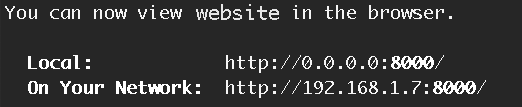
Grab your smartphone, open up your browser, and type in the IP address displayed on the On Your Network line, shown in the above screenshot. Let that Gatsby site resolve in your browser and your laptop and smartphone browsers will be in sync!
Game changer!

I’ve been reflecting more lately about how I spend my time online.
I think about the idea of taking back more control of my online presence.
I’ve made efforts to reduce attention and energy I give to social media.
And in these ways, I’ve never been more thoughtful of what I’m creating online than I am today.
It’s a challenge sorting out how to stay connected to people I care about who don’t understand the internet the same way I do. For the last couple of decades, my choice to live away from people I care about requires me to both make an effort to stay connected as well as participate in online communities. Sometimes that’s through social media, sometimes it’s here on my website. In fact, using this website, I’m learning how to create new ways to connect to others starting here on this site as a relationship to social media. I keep what I write here first primarily and syndicate or republish this content elsewhere secondarily. My site is my home and I want this home to contain what I create online more than I want to create elsewhere.
Lately, there’s another side in this I think about. In the last few months, I’ve had competing thoughts about this desire to post on here and in other places. These thoughts are in conflict of this need to own your own content or take control.
The need for connection is what makes the internet what it is. It’s what prompts us to browse websites, set up services, or download apps on our various devices. So often, communication on sites or services is performed in the moment. What we say, type or text matters but for a brief moment in time, as a reaction, for attention, or to provoke thought. So much of what I’ve said to others wasn’t formed but with a moment’s notice. This is true of many verbal conversations; our brains process things so quickly that we end up saying things without thinking and these thoughts are temporary.
I remember when I started using email in the 1990s (and the name included a dash [e-mail]), much of what I would get from people was forwarded emails or informal replies. I’ve even archived so much of my email since the 90s that I can review some patterns of what I used to send and receive from people. I was not aware of how much of what I sent was silly memes, jokes, poems or prose, things that were never meant to be more than just momentary. Having looked back upon a lot of that, it’s almost embarrassing what I thought was important or interesting enough to send to other people.
Even on this blog, I’ve written or copy and pasted a few silly posts that were in a similar mindset of just being interesting for a moment. I was lucky to have this platform to post to the few family or friends who would even read it. But some of these blog posts were meant to be meaningful in the moment I posted it.
When I look around at Twitter, Facebook, Pinterest, and so many other social media silos, I see a similar pattern as I remember with email. There’s a lot of forwarded, reposted, pinned, replied, retweeted, and generally recycled material that has a simple purpose for those moments.
Even in forum-like places like Reddit, Facebook Groups, and Slack/IRC, I see only some value in the threads and messages that people leave. More of what I see is that immediate connection we’re looking for, a way to bond, to engage or be engaged. And at some point, this content more or less disappears from the consciousness.
In the earlier days when companies were producing instant messengers like AOL, AIM, Yahoo, ICQ, MSN, and so many others, I had countless conversations that I can’t recall what was discussed. Those conversations are mostly lost in time, the recipients sometimes forgotten.
I can’t even tell you what some of my earliest posts on this website say without looking as well as what I said on younger versions of Twitter, Reddit, Facebook, or Yelp. Plenty of it doesn’t really matter to me and I suspect that most people feel the same way. I’ve seen my own family use these various sites and apps to communicate and catch up on each other’s lives. There’s not a lot of thought that goes into it otherwise.
If I was to suddenly lose access to everything I’ve ever written everywhere online, the noise of forwarded posts and emails being lost forever would not tear my heart into two. In the various replies by email and text message, or posts on Facebook, Medium, Reddit, and Twitter where I’ve made spontaneous remarks or thoughts, debates, support for trivial and non-trivial, like religious or political content, there’s little or no value to much of that.
I suppose the last section sounds fairly apathetic and nihilistic. No matter what truth there is in what I’ve just said, there’s plenty online that I’ve poured my heart into and and would make me sad to lose. I’ve manually backed up or saved some of the more important things I’ve written into the virtual world or in conversations I’ve had. These are a part of my personal history as who I am and I’d lose that part if it was to disappear.
It’s gonna be an ongoing challenge for me to figure out how to choose between forever posts that I write here and in-the-moment posts, tweets, comments, conversations, and chats that I have elsewhere. Some of this might change when I can figure out a way to encrypt certain content so that approved connections will be able to read what I write. This conversation crosses into my personal privacy as well. The less I solely use social media, it’s better for my overall privacy.
Many people won’t face the same issues I do; many are satisfied posting freely on free sites or apps irregardless of what happens to what they post or who gets their data. It’s just as ephemeral as email has been. I hope we’ll continue to see effective, popular and free ways to stay connected to each other on the internet like we do now but with less personal costs to our freedoms and privacies.
Maybe the idea of controlling our online presence and posts is more popular with more people than I realize, but my personal experience tells me otherwise. We just want a place to be together, share things, and live in the moment. We have that in so many ways and it’s still working, even if bad things happen.
The benefits of native web components are clear:
- native, no framework needed
- easy integration, no transpilation needed
- truly scoped CSS
- standard, just HTML, CSS and JavaScript
Whoa, native support for Web Components is here? Going through the process of learning advanced Javascript, React.js and broader programming, the prospect of Web Components being a system I can use that browsers already support is so appealing.
The biggest concern I want to learn about is accessibility and the fact that Web Components basically use an extension of javascript to work. I browse the web with plugins that disable Javascript by default for most sites and I enable what I want to run, for security, privacy and performance reasons (maybe a topic for another post).
There are so many quotable lines in his post that I wish I could highlight everything here but just go read it for yourself.
EDIT June 30: As much as I want to believe in the hype, I’m going to continue my front-end code without web components.